Meal Planner KDP Graphic: A Fully Editable Canva Template for Streamlined Meal Planning
The Meal Planner KDP Graphic is a comprehensive, fully editable Canva template designed to help individuals and families streamline their meal planning process. This digital planner offers a clean, organized layout that allows users to customize fonts, colors, and layouts to suit their preferences. Whether you're aiming to maintain healthy eating habits, manage grocery shopping, or track nutrition goals, this planner provides a structured yet flexible framework for daily, weekly, and monthly meal planning.
As a digital resource, the Meal Planner KDP Graphic is ideal for those who want to integrate meal planning into their broader productivity routines. It fits seamlessly into workflows that involve time management, goal setting, and task organization. Its compatibility with Canva ensures that users can easily modify and print it as needed, making it suitable for both digital and physical use.
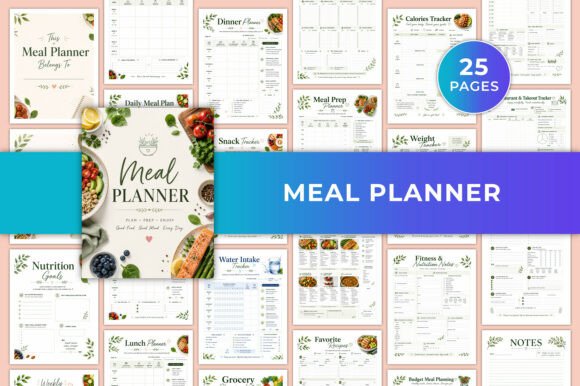
What's Included in the Meal Planner KDP Graphic
The Meal Planner KDP Graphic comes with a variety of features designed to support different aspects of meal planning. These include:
- Nutrition Goals Planner: Helps set and track specific dietary objectives such as calorie intake, macronutrient ratios, or weight management targets.
- Daily, Weekly, Monthly Meal Planning: Offers templates for each timeframe, allowing users to plan meals in advance and stay consistent with their eating habits.
- Breakfast, Lunch, Dinner Planners: Provides dedicated sections for each meal type, making it easy to organize and prepare meals efficiently.
- Snack and Water Intake Trackers: Keeps users accountable for hydration and snack choices, which are often overlooked but essential components of a balanced diet.
- Grocery Shopping Lists: Includes customizable lists for weekly groceries, helping reduce waste and ensure all necessary ingredients are on hand.
- Pantry Inventory Tracker: Tracks what's available at home, preventing unnecessary purchases and encouraging the use of existing ingredients.
- Meal Prep Planner: Assists in organizing meal prep schedules, portion sizes, and cooking times to maximize efficiency.
- Healthy Recipe Pages: Features space for adding personal or favorite recipes, promoting variety and creativity in meal planning.
- Calories and Weight Trackers: Enables users to monitor progress toward fitness and wellness goals by tracking caloric intake and weight changes over time.
- Fitness and Nutrition Notes: Allows for personalized notes on workout routines, supplement usage, or dietary restrictions.
- Budget and Family Meal Planning: Helps manage food budgets and accommodate the needs of multiple family members with different preferences.
- Restaurant Takeout Tracker: Keeps a record of dining out experiences, useful for maintaining balance between home-cooked meals and restaurant visits.
- Reflection Notes Pages: Encourages self-assessment and reflection on eating habits, providing insights for future improvements.
This comprehensive structure makes the Meal Planner KDP Graphic a valuable tool for anyone looking to take control of their nutrition and meal planning process.
Key Features That Make the Meal Planner KDP Graphic Stand Out
One of the most notable aspects of the Meal Planner KDP Graphic is its flexibility. The template is fully editable within Canva, giving users the freedom to adjust fonts, colors, and layouts according to their personal style or brand identity. This feature is particularly useful for creators, bloggers, and educators who may want to incorporate the planner into their content or offer it as a downloadable resource to their audience.
Another key feature is the clean and easy-to-use layout. Unlike some planners that can feel cluttered or overwhelming, this template maintains a minimalist design that promotes focus and clarity. Each section is clearly labeled, making it simple to navigate and update regularly.
The planner is also printable and digital-friendly, offering versatility for users who prefer to keep a physical copy or access it digitally on a tablet or phone. This dual functionality supports various lifestyles and work environments, whether someone is planning meals from home or on the go.
Who Benefits Most from Using the Meal Planner KDP Graphic
The Meal Planner KDP Graphic is well-suited for a wide range of users, including:
- Healthy Lifestyle Planners: Individuals committed to maintaining a balanced diet and regular exercise routine.
- Weight Management Enthusiasts: Those seeking to lose, gain, or maintain weight through structured meal planning.
- Meal Prep Enthusiasts: People who enjoy preparing meals in advance to save time and ensure healthy eating throughout the week.
- Families: Parents who need to coordinate meals for multiple family members with varying dietary needs and preferences.
- Fitness and Wellness Goal-Setters: Athletes, trainers, or individuals working toward fitness milestones who require precise nutritional tracking.
- Busy Professionals: Individuals with tight schedules who benefit from having a clear, organized meal plan to avoid last-minute decisions.
Whether you're managing your own health or supporting others in theirs, the Meal Planner KDP Graphic provides a reliable and adaptable solution.
How to Integrate the Meal Planner KDP Graphic Into Your Routine
To get the most out of the Meal Planner KDP Graphic, consider integrating it into your weekly workflow. Start by setting aside a few minutes each Sunday (or another day that works best for you) to plan meals for the upcoming week. Use the Daily, Weekly, and Monthly Meal Planning sections to outline what you'll be eating each day, ensuring that you have a variety of options and account for any dietary restrictions or preferences.
For those who frequently cook in bulk or practice meal prepping, the Meal Prep Planner is an invaluable tool. You can schedule when to prepare meals, how many portions to make, and where to store them. Pairing this with the Pantry Inventory Tracker will help you avoid buying duplicate items and ensure that you're using what you already have on hand.
If you're tracking fitness goals, the Calories and Weight Tracker can be used in conjunction with other tools like fitness apps or wearable devices. By logging your food intake and comparing it to your fitness activities, you can gain a better understanding of how your diet impacts your overall health and performance.
Additionally, the Reflection Notes Pages provide an opportunity for self-assessment. After a week of following your meal plan, take a moment to reflect on what worked well and what could be improved. This habit encourages continuous improvement and helps you stay motivated to maintain healthy eating patterns over the long term.
Practical Implementation Tips and Workflow Examples
To ensure smooth implementation of the Meal Planner KDP Graphic, start by customizing the template to fit your aesthetic preferences. Choose fonts and colors that align with your personal style or brand if you're sharing it publicly. Once customized, save the file in PDF format for easy printing or digital access.
For example, a busy professional might use the planner to plan meals for the entire week, including snacks and water intake. They can then use the Grocery Shopping List to create a list of ingredients needed and cross off items as they're purchased. Meanwhile, the Restaurant Takeout Tracker can be used to log any dining-out experiences, helping them stay mindful of their overall food consumption.
A family might use the Budget and Family Meal Planning section to coordinate meals that cater to each member's preferences while staying within a set budget. They can also use the Pantry Inventory Tracker to keep track of what's available at home, reducing food waste and saving money.
For educators or bloggers, the Meal Planner KDP Graphic can be a valuable resource to share with followers or students. By offering it as a downloadable template, they can encourage others to take charge of their meal planning and promote healthier lifestyles.
Incorporating the Meal Planner KDP Graphic into your routine not only simplifies meal planning but also enhances your ability to maintain consistency and achieve your health and wellness goals. With its customizable design and comprehensive features, it's a versatile tool that can adapt to a wide range of lifestyles and needs.